
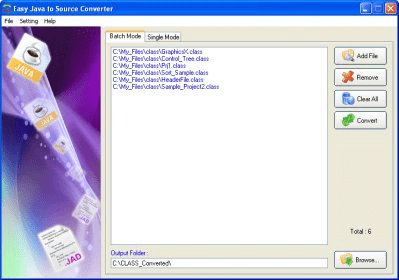
Easy JAVA to Source Converter, developed by Armenian Dictionary Inc., is a very easy-to-use yet powerful tool for those who need to decompile and disassemble JAVA based routines. Upon the creation of JAVA code, a compiled binary CLASS file is written on the computer. That file is normally unreadable, but with the help of this application you will be able to read it. It is used for what is usually called as Reverse Engineering, or in a common slang known as copy. What this awesome tool does is reconstructing the original source code from the compiled binary CLASS files, so you can know how it was written originally. It is able to decompile complex Java applets and binaries, producing accurate source code.
In the promotional web page you won’t find suggested the copy activities, naturally, since it’s a pretty obvious illegal activity unless you have permission of the creator, in which case you could directly get the source code and you wouldn’t need this tool. So it’s said to be oriented to developers who could have lost or accidentally destroyed their source codes.
Easy JAVA to Source Converter is a stand-alone Windows application and doesn't require having JAVA installed.
Let’s see how easy it is to put this tool in action. To decompile a JAVA CLASS file you need to follow three easy steps:
1. Simply open your class file by clicking the "Browse..." button on the main window of the application.
2. Click on the “Convert” button on the left-down corner.
3. Finally, click on the “Copy” button to copy converted code into clipboard or “Save” button to save it in a file.
As you can see, the application has been perfectly named as an “easy” converter.
Regarding system requirements, you don’t need to have a too powerful system to run this beauty. Let’s take a look to the list:
Easy JAVA to Source Converter needs the following hardware requirements:
• Pentium compatible CPU
• 32 MB RAM or more
• 4 MB free space or more for the software's installation and running
• Mouse and Keyboard
What it could result not very attractive for many potential users of an application of this nature, is the fact that it only runs in Windows based systems. It runs almost in every version of Windows though (32 bits versions only). Check the list below:
• Microsoft Windows 98
• Microsoft Windows ME
• Microsoft Windows NT
• Microsoft Windows 2000
• Microsoft Windows XP
• Microsoft Windows 2003
• Microsoft Windows Media Center 2005
• Microsoft Windows Vista
You can try this tool for free for an unlimited period of time but with the limitation of not being able to copy or save the outcome. Anyways, there are no many testes to make since the simplicity of the program. If you decide to purchase the Easy JAVA to Source Converter you can do it online using a credit card, and it will only cost you $ 9.95!






Comments